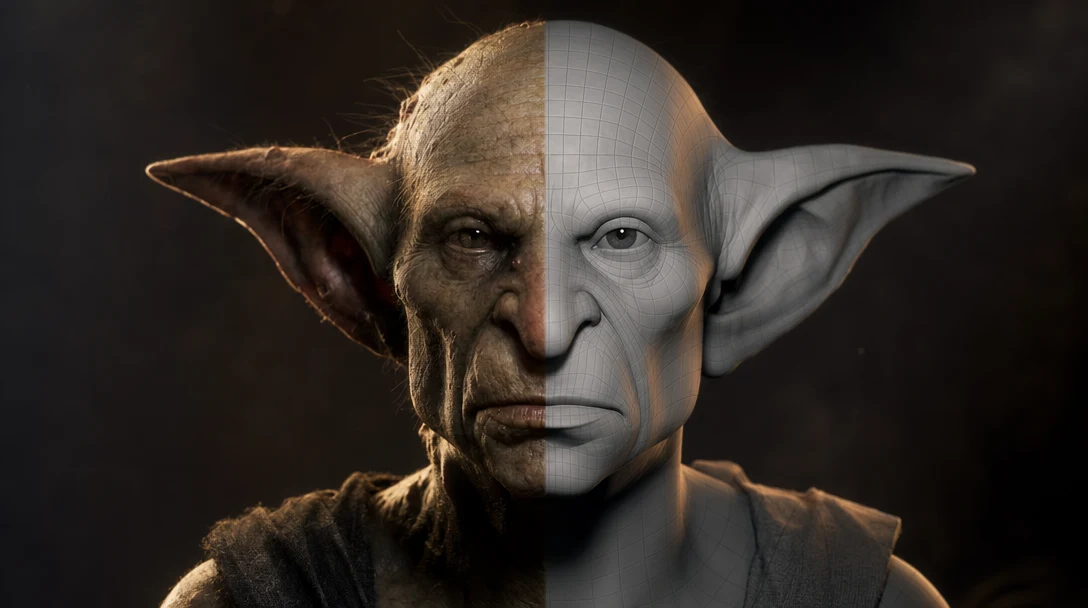
Quick Answer
Retopology is rebuilding a 3D model's surface with new geometry while keeping its shape. You swap a dense or chaotic mesh for a lean one made of evenly flowing quads, with edge loops aligned to how the surface will bend and be textured. For AI-generated models specifically, it is usually the step between a preview that looks finished and an asset that will actually animate, UV-unwrap, optimize, and import cleanly — because most generators produce a shape correctly but the topology underneath it wrong.
Shape vs. Topology: Why Two Identical-Looking Models Aren't Equal
A 3D model is a surface described by vertices, edges, and faces. *Topology* is the layout of that surface: how many polygons there are, where the edges run, and whether the faces are quads (four-sided), triangles, or messy n-gons (five or more sides). The shape is what you see; the topology is the wiring underneath. Two models can be pixel-for-pixel identical in a render and yet one rigs in an afternoon while the other is unusable.
Retopology never touches the silhouette. It rebuilds the wiring. The standard workflow takes a high-resolution source — a sculpt, a photogrammetry scan, or an AI generation — and lays a new, lower-density mesh over the top, letting it "shrink-wrap" to the original form. The visible detail is preserved (usually baked into a normal map) while the live geometry becomes lighter and far more predictable to rig, skin, unwrap, and export.
What Bad Topology Actually Costs You
A flat wall can be described by two triangles or by twenty thousand. Both render the same, but the second one wastes memory, resists every edit, and bakes badly. Topology only stops being free the moment you do something other than look at the model — bend it, unwrap it, drop it into an engine — and then it decides whether that step takes minutes or days.
Messy topology causes concrete, recurring problems:
Deformation artifacts. When a character bends an elbow or a face smiles, edge loops need to follow the muscle and joint lines. Random triangles pinch, collapse, or stretch in ugly ways.
Performance cost. Dense or non-uniform meshes burn GPU and memory budget, slow down real-time engines, and inflate file sizes.
UV and texturing pain. UV unwrapping is far harder on tangled geometry. Seams land in bad places and textures stretch.
Editing friction. Selecting loops, beveling, and making clean edits is nearly impossible on chaotic faces.
Export and pipeline failures. N-gons, non-manifold edges, and inverted normals break engine imports, collision, and lightmaps.
AI generators are particularly prone to this because of how they build geometry. Most reconstruct a surface from a density field and tessellate it — a marching-cubes-style process that drapes a uniform triangle grid over the shape. The grid has no idea where a knee bends or where a seam should run; it just fills space. The result frequently passes the eye test in a turntable render and then falls apart the instant you load it into a rig, because the triangles do not know the difference between a forearm and a flat panel.
How Retopology Is Done
There are three broad approaches, and most production pipelines mix them depending on the asset.
Manual retopology means an artist draws the new mesh by hand, polygon by polygon or strip by strip, snapping it to the high-res source. It is the slowest method and the highest quality. Hero characters and faces are still often retopologized by hand because human judgment about edge flow beats any algorithm.
Automatic / AI retopology uses an algorithm to remesh the surface to a target polygon count. Blender ships a native option here: the Quad Remesh in Sculpt mode (and the Remesh modifier), which rebuilds the surface to a chosen face density. Paid plugins push the quality further — the QuadRemesher plugin for Blender and Maya, made by Exoside, comes from the same developer behind ZBrush's ZRemesher, and many AI 3D generators now bundle their own auto-retopology pass. These tools are fast and often good enough for props, background assets, and first-pass game meshes. They are weaker on areas that need deliberate edge loops, like mouths, eyelids, and finger joints — they distribute polygons evenly and have no concept of where an elbow will bend.
Semi-automatic runs an auto pass, then has an artist fix the critical zones by hand. This is the most common professional compromise: let the machine handle the bulk surface, spend human time only where deformation demands it.
Quad Topology vs Triangles vs N-Gons
Not all polygons are equal. The polygon type you target is one of the most important retopology decisions.
Polygon type | Best for | Subdivision-friendly | Deformation-friendly | Risk |
|---|---|---|---|---|
Quads (4-sided) | Sculpting, animation, subdivision modeling | Yes | Yes (with good loops) | Slightly more polys than tris |
Triangles (3-sided) | Final game/real-time export, hard-surface props | No (locks the surface) | Acceptable if pre-deformed | Bad edge flow if auto-generated |
N-gons (5+ sides) | Temporary blockouts only | No | No | Breaks engines, normals, baking |
A useful rule of thumb: model and animate in quads, then triangulate on export for the engine. Quads give you clean edge loops and predictable subdivision; engines render triangles anyway, so triangulation at the export step is expected and fine. N-gons are the one type to avoid in any deliverable — they are acceptable only as a scaffolding step you clean up before handoff.
Retopology Decision Matrix
You should not retopologize everything. The honest question is whether the asset's downstream value is higher than the cleanup cost. This matrix maps common destinations to how much retopology effort is justified.
Use case | Retopology priority | Typical approach |
|---|---|---|
Mood board or concept | Low / skip | Use raw AI mesh as-is |
Static prop prototype | Medium | Auto-remesh to a sane poly count |
Game-ready prop | Medium to high | Auto + manual fixes, triangulate on export |
Animated character | High | Manual or semi-auto with proper loops |
Hero asset (close to camera) | High | Manual, careful edge flow + baked detail |
VFX reference object | Depends on shot | Skip if far; retopo if it deforms or holds frame |
Final production asset | High | Full retopo, clean UVs, LOD chain |
The point of the matrix is to stop teams over-cleaning assets that only need to communicate direction, and under-cleaning assets that will carry a shot or a level.
Reading an AI Mesh's Wireframe Before You Commit Cleanup Time
Switch any candidate to wireframe or face-orientation view before you decide to retopologize it. These six signals tell you, in under a minute, whether you're looking at usable geometry or triangle soup:
Edge flow follows the form. Loops wrap around limbs, run along muscle lines, and circle the mouth and eyes. Random crisscrossing triangles are a red flag.
Even, purposeful polygon density. Detail-heavy areas have more polygons; flat areas have fewer. Uniform density everywhere usually means an auto-generated marching-cubes mesh.
Mostly quads. Quad-dominant geometry subdivides and deforms predictably.
No non-manifold geometry. No internal faces, no edges shared by more than two faces, no floating verts.
Consistent normals. All faces point outward; no black or flickering patches.
Poles are controlled. Five-edge poles (E-poles) and three-edge poles (N-poles) exist in real topology, but they should sit in flat areas, not on a bending joint.
If most of these fail, no amount of re-prompting will fix it — the generator does not control edge flow, so regenerating just hands you a differently-tangled mesh. The fix is a cleanup pass on the geometry you already have, which is the territory covered in what to do with an AI 3D model after the first mesh.
Sequencing Retopology Against Generation
The wrong instinct is "generate, then retopologize everything." That front-loads cleanup onto assets you may never ship. A more efficient loop looks like this:
Generate several candidates from the same prompt or reference image.
Reject the ones with melted, tangled, or hollow geometry early — before any cleanup.
Choose the candidate with the best shape *and* the lowest cleanup cost, not just the prettiest render.
Retopologize only when the destination requires it, matching effort to the decision matrix above.
The hard part of that loop is the comparison: judging topology means looking at several candidates' wireframes against the same target, not picking the best render. That is awkward in a linear generate-export-reimport flow, where each candidate lives in a separate file and the wireframe is two tool-switches away. Customuse's Nodes Editor keeps the generation step and a retopology step as adjacent, re-runnable nodes on one canvas, so a wireframe view of every variant sits next to its render and the team can reject the triangle-soup candidates before anyone spends an hour cleaning the wrong one. When the chosen mesh changes, the retopo node re-runs instead of forcing a manual round-trip.
Where Retopology Goes Wrong
Retopologizing concept assets. Spending hours cleaning a mesh that only needed to communicate a direction.
Targeting too few polygons for a deforming asset. A character with too sparse a mesh cannot bend cleanly no matter how good the loops are.
Ignoring deformation zones. Auto-remeshers do not know where an elbow is. Letting the algorithm own a joint produces pinching.
Shipping n-gons or non-manifold edges. These pass in the viewport and fail in the engine.
Skipping the normal-map bake. Retopo lowers polygon count; if you do not bake the high-res detail into a normal map, you throw away the detail you generated.
Triangulating too early. Triangulate on export, not while you still need to edit edge loops.
FAQ
What is retopology in simple terms?
Retopology is rebuilding a 3D model's surface with new, cleaner geometry while keeping the original shape. You replace a dense or messy mesh with an efficient one whose edges flow sensibly, so the model becomes easier to animate, texture, optimize, and export.
Do AI-generated 3D models need retopology?
Often, yes — but not always. AI generators tend to produce plausible-looking surfaces with topology that is not built for deformation or performance. If the asset will be animated, optimized for a game engine, UV-unwrapped carefully, or reused as a hero asset, plan for retopology. Concept art, static placeholders, and far-background objects can usually skip it.
What is the difference between retopology and decimation?
Decimation blindly reduces polygon count by collapsing edges, with no regard for edge flow — fast, but it produces triangle soup unsuitable for animation. Retopology rebuilds the surface with intentional, mostly-quad topology and clean loops. Decimation is fine for static, far assets; retopology is what you need for anything that deforms or needs clean UVs.
How many polygons should a retopologized model have?
It depends entirely on the target. A mobile game prop might live at a few hundred to a couple thousand triangles; a current-gen hero character can run tens of thousands. The goal is not a magic number but the lowest density that still deforms cleanly and holds silhouette at its on-screen size, with finer detail pushed into a normal map.
Should I model in quads or triangles?
Model and animate in quads, then triangulate on export. Quads give clean edge loops, predictable subdivision, and good deformation. Engines render triangles regardless, so converting at the export step is standard and expected — just avoid keeping n-gons anywhere in the deliverable.
Is automatic retopology good enough?
For props, background assets, and first-pass game meshes, modern auto-retopology is frequently good enough. For characters, faces, and hero assets that deform, automatic results usually need manual fixes around joints, mouths, and eyes, where deliberate edge flow matters more than any algorithm can currently judge.