
Quick Answer
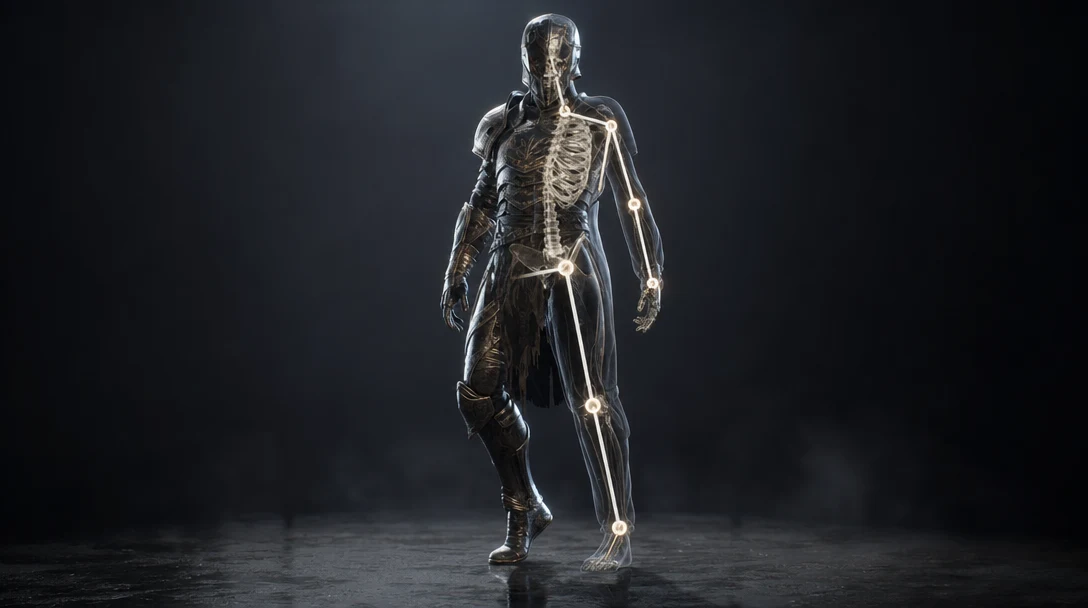
3D model rigging is the process of building a control system into a model so it can move. For characters, that system is a skeleton of bones and joints bound to the mesh through skin weights, usually driven by inverse kinematics and named controllers. For props and machines it can be far simpler: correct pivots, hinges, or constraints on separated parts. A rig does not change how a model looks at rest; it defines how the model is allowed to deform. That distinction is why a mesh that renders perfectly as a still image can be impossible to rig until its topology and part separation are fixed.
Rigging In Plain Terms
A finished 3D mesh is just a frozen surface. It has no concept of an arm, a knee, a lid, or a wheel. Rigging is the layer that tells software which parts of that surface belong together, how they connect, and how they are permitted to bend or rotate. The rig is the puppet strings; animation is the performance.
For a character, rigging answers questions like: where does the elbow pivot, how much of the forearm follows the upper arm, how do the shoulder and clavicle interact, and how far can the jaw open before the mesh tears. For a prop, the questions are smaller but real: where is the door hinge, does the wheel rotate around its true center, and is the lid a separate object or fused to the body.
This distinction matters more in the AI era than it used to. AI 3D generators are extremely good at producing a convincing static surface from a prompt or a reference image, but the surface is the easy part. The structure underneath, the part separation, the topology, and the pivots that make motion possible, is where most generated assets fall short.
How Rigging Actually Works
Rigging is a sequence of steps, not a single button. Even when parts of it are automated, the same stages happen under the hood.
Prep the mesh. The model is cleaned, scaled correctly, oriented to face the right axis, and checked for non-manifold geometry, holes, or fused parts. Garbage in, garbage out.
Build the skeleton. Bones and joints are placed inside the mesh in a parent-child hierarchy. The hip or root sits at the top; limbs and fingers branch off it.
Bind and weight. The skin (the visible mesh) is attached to the skeleton, then skin weights are painted so each vertex follows the right bones by the right amount. Bad weights cause candy-wrapper pinching at joints.
Add controllers and constraints. Inverse kinematics (IK) lets an animator move a hand and have the arm follow naturally. Constraints, drivers, and named control shapes make the rig fast and predictable to pose.
Add deformation helpers. Corrective shapes, blendshapes for faces, and helper joints clean up bending at shoulders, hips, and elbows.
Test the range of motion. The rigger pushes the rig to extreme poses to find where the mesh breaks, then fixes weights or topology before handoff.
For props, the process collapses to prep, set pivots, parent moving parts, and add simple constraints. A treasure chest needs a lid pivot. A car needs four wheel pivots and a steering linkage. Neither needs a humanoid skeleton.
Most of this work happens in a dedicated DCC (digital content creation) tool. Blender, Maya, and 3ds Max are the usual homes for hand-built rigs, with Blender's Rigify and Maya's HumanIK providing semi-automatic skeletons for humanoids. For a fast, no-skill humanoid pass, Adobe's free Mixamo will auto-place a skeleton and skin weights from an uploaded mesh in under a minute, which is exactly the auto-rigging path AI-generated characters most often hit first. The catch is that all three approaches assume a reasonably clean mesh going in, and that assumption is where generated assets tend to break.
Why Rigging Matters For AI-Generated 3D
AI tools can generate striking static models, but animation requires structure that generation does not guarantee. This is the single biggest gap between "I generated a cool model" and "I shipped an animated asset."
A model usually needs rigging if it has any of the following:
Limbs, fingers, or a tail that should bend.
Facial motion such as talking, blinking, or expression.
Mechanical parts, levers, or pistons.
Doors, lids, drawers, or hinges.
Wheels, treads, or rotating components.
Soft or flexible surfaces like cloth, hair, or cables.
Reusable poses or animation states across a project.
Here is the catch with generated assets: most raw outputs arrive as a single fused mesh, sometimes with triangulated or chaotic topology and no clean edge loops at the joints. That is fine for a static render or a concept frame. It is a problem the moment you want the elbow to bend, because there is no clean geometry there to deform and no separate part to pivot. Treating rigging as automatic for AI output is how cleanup projects are born.
This is exactly why generated models should be judged by intended behavior, not by how good the still looks. A static background prop may never need a rig. A hero character, a wearable, a vehicle, a creature, or any interactive object almost certainly does, and that requirement should shape how the asset is generated and inspected from the start. The same structural thinking applies one step earlier, when you prepare AI 3D models for animation, and one step before that during retopology, which is often what makes a generated mesh riggable in the first place.
Character Rigging vs Prop Rigging vs Auto-Rigging
Not all rigging is the same job, and matching the method to the asset saves enormous time. The table below compares the three approaches you will actually choose between for AI-generated assets.
Dimension | Character rigging | Prop / mechanical rigging | Auto-rigging |
|---|---|---|---|
Typical assets | Bipeds, creatures, NPCs, wearables | Doors, weapons, wheels, lids, machines | Humanoid characters in standard pose |
Core technique | Skeleton, skin weights, IK, controllers | Pivots, parenting, constraints | Template skeleton auto-fit to mesh |
Common tools | Blender, Maya, 3ds Max | Blender, Maya, any DCC | Mixamo, Blender Rigify, Maya HumanIK |
Topology demands | High: clean quads, edge loops at joints | Low to medium: clean part separation | Medium: works best on clean humanoids |
Time to rig | Hours to days | Minutes to hours | Seconds to minutes |
Strength | Full expressive, deformable control | Fast, predictable mechanical motion | Speed and a usable first pass |
Weakness | Slow, skill-intensive | Limited to rigid motion | Struggles on messy or fused AI meshes |
Best for AI output | After retopology and inspection | When parts are already separated | Quick previews and clean humanoid meshes |
The useful question is never "can this be rigged?" Almost anything can be rigged with enough effort. The useful question is "what kind of motion does this asset actually need, and is its structure ready for that motion?" A door that needs to swing does not need a humanoid skeleton, and a hero character does not get away with a single pivot.
How To Check If An AI Model Is Rig-Ready
Rigging exposes problems that are invisible in a static preview. A model can look flawless until a limb bends, a door rotates, or a character holds a pose, and then the hidden flaws surface all at once. Run this check before you commit time to rigging.
Mesh integrity. Is the geometry watertight where it should be, with no stray holes, flipped normals, or non-manifold edges?
Part separation. Are the things that must move independently actually separate objects, or are they fused into one shell?
Topology for deformation. Are there clean edge loops at elbows, knees, shoulders, and the jaw, or is it a dense triangle soup that will pinch?
Scale and orientation. Is the model at real-world scale and facing the expected axis for your engine or DCC tool?
Symmetry. Is a character symmetrical enough to mirror weights and controllers?
Pivots. For props, does each moving part rotate around its true hinge or axle, not the world origin?
Material organization. Are material slots preserved and named so they survive the rig and export?
Motion target. Have you decided whether this needs full character rigging, simple object controls, or no rig at all?
If a model fails several of these, rigging becomes a repair job. The smarter path is to fix structure first or regenerate, then rig only the strongest candidate. A practical sequence looks like this: generate the model, inspect the mesh, decide the motion requirements, clean or retopologize, rig only the asset worth rigging, then test the full range of motion. The same readiness mindset shows up across the broader AI 3D asset pipeline, where rigging is one gate among several rather than a magic final step.
A Concrete Example: The Robot Arm
A generated robot arm can look complete in a static render and still be unusable as an animated asset. Rigging asks the questions the render never did:
Is the shoulder a separate object from the upper arm, or fused to it?
Does the elbow have a clean pivot and edge loops, or will it crumple when bent?
Is the hand one solid block, or are the fingers separate enough to grip?
Are the cables and hydraulics functional parts, or decorative geometry baked into the shell?
The answers decide everything. If the joints are separate and pivots are clean, this is a fast mechanical rig. If it is one fused mesh, it is either a retopology and re-separation project or, more honestly, a visual reference that should not be rigged at all. This is why rigging doubles as a quality test for AI 3D: a pretty mesh is not automatically an object that can move, and rigging is the moment the difference becomes obvious.
Common Rigging Mistakes With AI Assets
Assuming generated models arrive rigged. Most do not. Plan for a separate rigging and cleanup stage in any pipeline.
Rigging before inspecting. Sending a fused or messy mesh into a rig turns a one-hour job into a multi-day repair.
Over-rigging a static prop. A background object that never moves does not need a skeleton; the time is wasted.
Ignoring scale and axis. A rig built at the wrong scale or facing the wrong way breaks the moment it hits a game engine.
Skipping range-of-motion tests. A rig that looks fine in T-pose can shred at full extension; always push it to extremes.
Losing material slots in cleanup. If retopology or re-separation drops material assignments, texturing and rigging both suffer downstream.
Rigging As The Make-Or-Break Stage
Rigging is the stage where static 3D becomes interactive or performable, and it is unusually unforgiving because it surfaces every structural shortcut taken earlier. For games it covers characters, doors, weapons, vehicles, and any prop with moving parts, and it has to respect game-ready poly counts and engine import rules. For VFX it covers creatures, mechanical hero props, and anything that needs controlled, art-directed motion across shots. For product visualization it can mean demonstrating how a hinge, lid, or modular part articulates. In all three cases the rig is built once and reused, so a flaw baked in at this stage propagates through every shot, level, or configuration that depends on it.
The practical lesson for AI assets is that the rig-worthiness decision should happen early, not after a mesh has already been handed to a rigger. The questions in this article — is it one fused shell, are there edge loops at the joints, are the pivots real, does this even need to move — are cheaper to answer while you can still regenerate or retopologize than after someone has spent a day painting weights onto geometry that was never going to deform.
That early-decision argument is the reason a node-based workspace fits rigging well. In Customuse, generation, the structural review, retopology, and the handoff toward a rig live on one canvas in the Nodes Editor, so a mesh can be branched into a "needs deform" path and a "static prop" path before any rigging time is committed, and the intended motion stays attached to the asset instead of living in someone's head. Customuse does not rig the model for you; it keeps the judgment about whether an asset is worth rigging next to the asset that prompts it, which is exactly where that judgment is cheapest to make.
Related Guides
FAQ
What is rigging in 3D modeling?
Rigging is the process of adding a control system to a 3D model so it can move or animate. For characters that means a skeleton of bones and joints bound to the mesh with skin weights; for props it can mean simple pivots, hinges, or constraints on separated parts. The rig itself is invisible at rest and only governs how the model is allowed to deform.
Do AI-generated models come rigged?
Usually not. Most AI 3D generators output a static, often single-fused mesh with no skeleton, pivots, or skin weights. Some tools offer auto-rigging for standard humanoids, but the result still depends heavily on clean topology and part separation, so generated characters frequently need retopology and a proper rig before they animate well.
Can any 3D model be rigged?
In principle almost any model can be rigged, but messy topology, triangulated geometry, fused parts, and unclear pivots make rigging slow, fragile, or impractical. The realistic question is whether the model has the structure for the specific motion you need, which is why inspecting and often retopologizing an AI mesh first is the difference between a fast rig and a repair project.
What is the difference between rigging and animation?
Rigging builds the controls; animation uses them. Rigging defines the skeleton, weights, pivots, and constraints that determine how a model can move, while animation is the act of posing those controls over time to create motion. You rig once and reuse the rig for many animations.
What should I check before rigging an AI model?
Check mesh integrity, part separation, topology and edge loops at deformation areas, scale and orientation, symmetry, pivot accuracy for props, preserved material slots, and the actual motion the asset needs. Failing several of these means cleanup or regeneration should come before rigging, not after.
How long does it take to rig a 3D model?
It depends entirely on the asset. A simple prop with one or two pivots can take minutes. A standard humanoid through auto-rigging can be a usable first pass in seconds to minutes. A production hero character with custom controllers, corrective shapes, and facial rigging can take from several hours to multiple days, plus more time if the source mesh needs retopology first.


