
Quick Answer
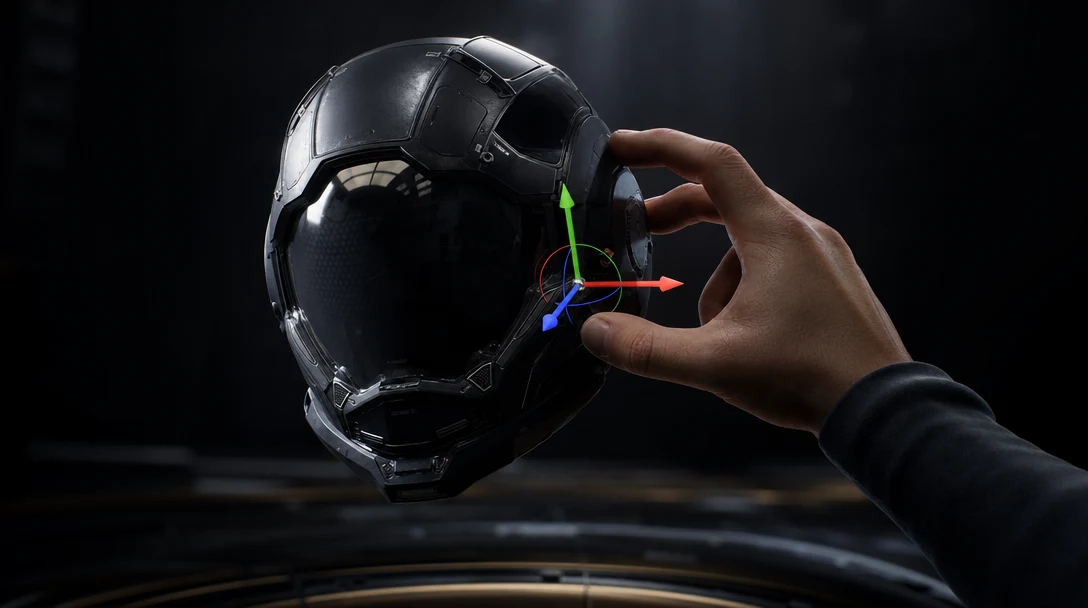
AI 3D creation needs a spatial interface — a viewport you can point into, grab, and steer — not just a chat box. The reason is a question of *input device*, not philosophy: a 3D edit like "rotate this 15 degrees" is a one-second drag with a gizmo and a multi-clause sentence in a prompt. Text is a fast way to express a starting idea and a slow, lossy way to perform a precise change. The interface that wins for professional 3D pairs language for the first idea with hands-on spatial controls for every edit after it: select, drag, lock, branch, and export by pointing rather than re-describing.
This piece is about the control surface, not the model. The argument is narrow and specific: the moment a 3D result needs to be *adjusted* rather than *regenerated*, a text-only interface forces you to round-trip your intent through a paragraph, and that round trip is where speed and accuracy both collapse.
The Real Cost: Every Edit Goes Through a Sentence
Here is the test. Open any prompt-only 3D tool, generate a result you almost like, and try to nudge it. The chrome is a half-shade too warm. The character's head should tilt slightly left. The crate should sit two units further back. None of those are new ideas — they are corrections to an existing thing. In a spatial interface they are a color-picker tweak, a gizmo drag, and a move. In a text interface they become a sentence you have to compose, and then a regeneration you have to hope respects everything you did *not* mention.
That gap is measurable in ways interface designers already name. Fitts's law says pointing at a visible target is fast and reliable; describing that same target in words is neither, because language has to first locate the object ("the second prop from the left, the one with the rivets") before it can act on it. A spatial interface skips the locating problem entirely — you click the thing. Direct manipulation also gives you *continuous feedback*: you see the object move as you drag, so you stop exactly where it looks right. A prompt gives you discrete, all-or-nothing feedback after a full generation, which is why prompt-only editing feels like negotiating with a slot machine.
This is the core of the spatial-interface argument, and it is specifically an *interface* argument. It is not a claim about memory or about agents — it is a claim about how a human and an AI should touch the same 3D thing.
What "Spatial" Actually Means Here
"Spatial interface" gets thrown around loosely, so be concrete. For 3D creation it means the control surface exposes the things that exist in space and lets you act on them in space:
A viewport you can orbit, so you judge a result from the angle that matters, not the one the tool rendered.
Selection — you can pick one object out of many and act on it alone.
Transform handles (gizmos) for move, rotate, and scale, with snapping and real units.
A material surface you edit by sampling and adjusting, not by naming a color in prose.
A camera you fly, with a real lens and framing, instead of a described point of view.
Persistent objects that stay put between edits so an adjustment is additive, not a fresh roll of the dice.
Notice that none of these are about *generating* anything. They are about handling what was generated. A pure chat interface can do the first job and almost none of the second, which is why a generated mesh so often dies as a screenshot: there was nowhere to pick it up.
Where the Prompt Belongs
This is not an anti-prompt argument, and the goal is not to bury language under buttons. Prompts are the best on-ramp ever built for 3D — they turn an empty viewport into a starting asset in seconds, and that is genuinely new. The error is using the same low-bandwidth channel for the high-precision work that follows.
A clean division of labor by *interface modality* looks like this:
Phase of work | Best modality | Why |
|---|---|---|
Express an initial idea | Language / prompt | High coverage, low effort; words describe possibility well |
Choose between directions | Side-by-side viewport | Judgment is visual; you compare, not describe |
Make a precise edit | Direct manipulation | Pointing beats locating-by-description |
Set framing and light | Camera and light tools | Spatial values (lens, angle, intensity) are read off, not narrated |
Lock what must not change | Selection + constraints | "Don't touch this" is a state you set, not a sentence you repeat |
Reuse a process | Node graph | A procedure is a structure, not a paragraph |
The pattern is that language is excellent at the top of the funnel and progressively worse as the work gets more spatial and more precise. A spatial interface gives every later phase its own native control instead of forcing all of them back through the prompt box.
The Continuity Problem Is an Interface Problem
The hardest thing to do in a prompt-only 3D tool is to keep something the same while changing something else around it. Reframe a shot without altering the hero asset. Try a new colorway without remodeling. Add a prop without disturbing the scale and lighting that already work. In text, "keep everything else" is an instruction the system has to interpret and frequently breaks, because the only record of "everything else" is the words you used to make it.
In a spatial interface, "keep everything else" is not an instruction at all — it is the default. The objects you did not select simply do not move. Continuity stops being something you plead for in every prompt and becomes a property of the interface, because the interface holds the scene as objects you can leave alone. This is why the same change that feels fragile in chat feels trivial on a canvas: one of them carries the scene forward by default and the other rebuilds it every time you speak.
Two Disciplines Where the Interface Decides the Outcome
Rather than survey every industry, look at two where the control surface, not the model, is the bottleneck.
Animation handoff. An animator does not need your render; they need an asset they can rig and move — correct pivot, real scale, clean topology, working materials, a sane node hierarchy. None of that is expressible as a better prompt. It is something you confirm by *looking* at the asset from the side, checking the pivot sits where the joint should, and exporting with the transform intact. A spatial interface is the only place that inspection happens. If you want the downstream requirements, see how to prepare AI 3D models for animation — every item on that list is a thing you verify by manipulating the asset, not by describing it.
Iterative look development. Dialing in a material or a lighting setup is dozens of micro-adjustments, each judged by eye. The value comes from tightening a loop: change roughness a touch, orbit, change it back a hair, move the key light. A prompt loop here is brutally slow because each step costs a full generation and a fresh description. A direct, spatial loop is where look-dev actually converges — which is also why a node-based AI 3D workflow matters: once the spatial adjustments land, the graph lets you replay them on the next asset instead of re-dialing by hand.
What a Spatial AI 3D Interface Should Expose
A serious workspace does not have to ship all of this on day one, but it should converge toward a control surface where every common 3D action has a native, non-textual home:
Capability | What you do with it | Why text alone can't replace it |
|---|---|---|
Orbitable viewport | Judge the result from any angle | A single rendered view hides the problem angles |
Object selection | Act on one thing among many | Describing "which thing" is slow and ambiguous |
Transform gizmos | Move, rotate, scale with snapping | Spatial deltas are dragged, not narrated |
Material editing | Sample and tune surfaces directly | Colorways are visual judgments, not adjectives |
Camera and lights | Set framing, lens, intensity | These are read off instruments, not described |
Selection-based locks | Freeze what must not change | "Keep everything else" should be a default, not a plea |
Side-by-side compare | Hold two directions on one canvas | Choosing is comparison, not scrolling a chat log |
Node workflows | Replay the steps that worked | A procedure is a graph, not a paragraph |
Real export paths | FBX, GLB, OBJ, USD with settings | Handoff needs transforms, not pictures |
The point is coverage. The instant one common action has *no* spatial home and falls back to the prompt, the asset is at risk of dropping out of the workspace and back into a screenshot.
Where This Leaves Customuse
Customuse is built so the prompt is the doorway, not the whole room. Generation happens, but it lands inside an orbitable canvas where the asset is a thing you can select, transform, relight, recolor, and lock — the spatial control surface this piece argues for. The Nodes Editor gives the *process* a visible structure you can replay; Cinema Studio gives the camera and lighting real instruments instead of described intentions; real-time multiplayer means more than one pair of hands can point into the same scene; and providers like Meshy, Tripo, and Hunyuan sit inside the graph as generation nodes whose output you then steer by hand.
To be fair about it: this is not a claim that prompts are obsolete, nor that Customuse out-generates every model on raw mesh quality, nor that anything it produces is finished without an artist's eye on it. The claim is narrower and, we think, more durable — generation is the easy half, and the interface you use to handle what comes out is what separates a clever demo from a shippable asset. Give an idea somewhere to be touched, and it stops being a screenshot.
FAQ
What is a spatial interface for 3D?
A spatial interface organizes control around the things that exist in 3D space — objects, transforms, cameras, lights, materials — and lets you act on them by pointing, dragging, and selecting in a viewport. It contrasts with a chat interface, where every action has to be encoded into a sentence and the system has to locate and interpret your target before it can act.
Are text prompts still useful for AI 3D creation?
Yes, and they are the best part of the on-ramp. Prompts turn nothing into a first asset faster than any other input. They are weakest at precise, additive editing — the work that happens after the first result — which is exactly where direct spatial controls take over. Use language to start; use the viewport to refine.
Why is editing so hard in a prompt-only 3D tool?
Because a correction to an existing object first has to *locate* that object in words and then describe the change, and the regeneration that follows can disturb everything you did not explicitly protect. Pointing at the object and dragging skips the locating step and gives continuous visual feedback, so you stop exactly where it looks right.
Is a spatial interface the same as remembering project state?
They are related but not the same. Project state is *what the workspace stores*; a spatial interface is *how you touch it*. You can hold state and still expose it badly. This piece is specifically about the control surface — the viewport, gizmos, and selection that let a human and an AI manipulate the same 3D thing directly.
Is "spatial AI" the same as world models or robotics?
No. A spatial interface for 3D creation is an authoring and control concept — a shared viewport where creators and AI build and adjust assets and scenes. That is distinct from world models or physical-AI and robotics systems, which aim to simulate or act in the physical world. This is about the interface used to make 3D content, not about simulation.


